

Last Updated on:
Disclosure: CoreRated is reader-supported. We earn an affiliate commission when you click through and buy services we recommend. This comes at no extra cost to you and helps keep our site running.
Quick Verdict: Should You Choose Cloudways?
Welcome to our in-depth Cloudways Review. This platform is not just another managed host; it is a Managed Cloud Platform that removes the complexity of managing server infrastructure.
By handling companies like DigitalOcean, AWS, and Google Cloud, making enterprise-level hosting accessible to everyone. Our honest assessment is that For 2026, the platform offers a combination of scalable compute power and pay-as-you-go utility.
In this updated Cloudways Review, we take a deep dive into the platform’s 2026 performance metrics. Our goal is to see if it still holds the title of the most flexible managed host on the market, especially with recent shifts in the cloud infrastructure landscape
| Verdict | Why Choose Cloudways | Why You Might Pass |
| YES | You need a broad server choice (3+ providers), the new Lightning Stack designed for high-concurrency performance for agencies. | You prefer a “closed” ecosystem like WP Engine or Kinsta and want to avoid making any server-level decisions (like choosing between DO or AWS). |
Best Feature: Cloudways allows you to choose from top-tier cloud providers like DigitalOcean, AWS, and Google Cloud, giving you unmatched flexibility. With the new 2026 Lightning Stack now included on all plans, you no longer have to sacrifice simplicity for raw cloud power.”
Cloudways vs. The Competition
To understand Cloudways’ unique value, it is essential to see how its flexible model compares directly to the premium simplicity of WP Engine. This Cloudways Review breaks down the trade-offs.
Feature | ||
Starting Price | ≈ $11/mo. (DigitalOcean Micro Standard) | ≈ $25/mo. (Startup – Paid Annually) |
Pricing Model | Pay-As-You-Go (Hourly/Monthly) | Fixed Term (Monthly or Annual) |
Server Choice | 5 Providers (DO, Vultr, AWS, etc.) | 1 (Proprietary Google/AWS Mix) |
Data Center Locations | 65+ Global Locations (Across 5 Providers) | ~15 Locations (Google Cloud Standard) |
WordPress Sites | Unlimited (on any plan) | 1 Site (Startup Plan) |
Best For | Value, Scalability, & Agencies | Hands-off Security & Premium Simplicity |
Cloudways Pros: Flexibility & Value
1. Server Provider Options and Pricing Structure
Cloudways operates as a Managed Cloud Platform, meaning they handle complex maintenance, security, and optimization while giving you the freedom to choose your server engine. You can select from five leading cloud providers: DigitalOcean, Vultr, Linode (Akamai), AWS, and Google Cloud.
\This multi-cloud approach gives you access to over 65 data centers globally—far more than the standard ~15 offered by competitors like WP Engine—allowing you to host your site physically closer to your customers for near-instant load times.
This Cloudways Review confirms that this unique model allows for a balance between performance and costs (with plans starting at $11/month for DigitalOcean Standard) combined with the ease of a managed interface. Every 2026 plan now also includes the Lightning Stack and AI Copilot credits as standard features.
For a comparison of how different hosts leverage cloud infrastructure, see our Managed WordPress Hosting category page
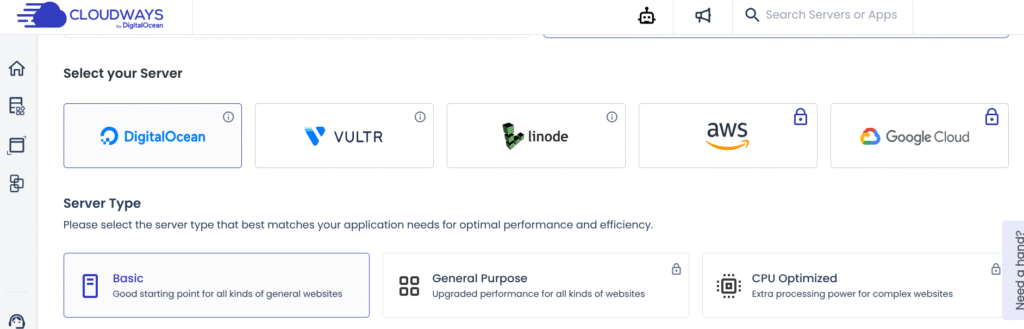
2. True Pay-As-You-Go Pricing
Cloudways utilizes an hourly billing, pay-as-you-go model—a major differentiator from traditional fixed-contract hosting. You only pay for the exact resources you consume, eliminating wastage for agencies or businesses with seasonal traffic spikes.
3. Advanced Developer Tools and Workflow
The Cloudways platform is built for efficiency, security, and performance. In 2026, The managed layer includes CloudwaysBot, a proactive assistant that monitors server health and sends real-time alerts for common issues. This proactive assistant monitors server health and offers ‘SmartFix’ resolutions for common errors. Every server also includes essential, time-saving developer features:
- One-Click Staging: Safely test updates before pushing live.
- Dedicated Git Integration & SFTP: Essential for version control and secure file management.
- SafeUpdates (Add-on): Automatically detects, tests, and applies WordPress updates to prevent site breakage.
- Easy Server Cloning: Instantly duplicate applications to spin up new projects. Overall, our Cloudways Review rates these 2026 developer enhancements as some of the most advanced in the managed cloud space.
4. Expert Migrations, Smart Backups, & Security
Cloudways ensures a smooth start with its premium onboarding services. They offer one full-service, expert-led migration for your first WordPress site, handled by a senior engineer to ensure zero downtime. For those managing multiple sites, the Cloudways WordPress Migrator Plugin allows for unlimited automated transfers at no cost.
Beyond migrations, the platform’s security has seen major 2026 upgrades:
- Automated Offsite Backups: Regularly scheduled and easily restored with one click.
- Malware Protection (Powered by Imunify360): A new proactive defense add-on that detects and cleans infections automatically (starting at just $4/app).
- Free SSL Certificates: Every site includes a 1-click Let’s Encrypt SSL to ensure full HTTPS compliance.”
5. Excellent Pre-Sales & “High-Touch” Support:
Cloudways differentiates itself with a high-touch support model. Before you even spend a dollar, you can book a complimentary consultation with a Cloudways expert to discuss your server architecture and scaling needs. For 2026, their support has become even faster, with managed migration turnarounds now averaging under 4 hours. This level of personalized onboarding makes them an ideal partner for agencies and businesses that cannot afford to wait for standard ticket responses.

Cloudways Cons: The Trade-Offs
While this Cloudways Review highlights significant advantages, the platform is not without its trade-offs.
1. Steeper Learning Curve (Not “Hands-Off”)
Unlike proprietary hosts such as WP Engine, Cloudways is a platform of choice. You must still select your underlying cloud provider (DigitalOcean, AWS, etc.) and server size. While the 2026 AI Copilot helps bridge the gap, an absolute beginner may still find the initial setup intimidating compared to “one-size-fits-all” platforms.
2. Email Hosting is a Paid Add-On
Cloudways focuses purely on server performance and does not bundle free email accounts. To get a professional address (e.g., name@yourdomain.com), you must use an add-on. Cloudways offers a native Rackspace Email Add-on starting at $1 per mailbox/month. While affordable, this represents an extra recurring cost and setup step not found on some traditional managed hosts.
| Email Solution | Cost/Availability |
| Rackspace Email Add-on | $1 per mailbox/month |
| Elastic Email Add-on | Paid service (for transactional emails) |
| Free Options | Gmail/Google Workspace SMTP (Requires external account) |
3. No Native File Manager
One persistent “con” for 2026 is the lack of a browser-based file manager in the dashboard. To edit or upload files, users must use SFTP (like FileZilla) or SSH. For users accustomed to the “File Manager” found in cPanel or SiteGround, this adds a layer of technical complexity to simple tasks like editing a wp-config.php file.
4. Offsite Backup Costs
While Cloudways performs automated backups, they are stored offsite to ensure safety. This service incurs a small additional fee (typically $0.033 per GB). While the cost is negligible for small sites (usually around $0.50 – $1.00/month), it is a separate line item on your bill that you must account for.
| Service | Cost | Requirement |
| Rackspace Email | $1 / mailbox | For professional email |
| Elastic Email | Starts at $0.10 / 1k emails | For marketing/transactional mail |
| Offsite Backups | ~$0.033 / GB | For data disaster recovery |
| Malware Protection | Starts at $4 / app | For proactive security scanning |
Who Should Avoid This Platform?
While our Cloudways Review highlights massive performance gains, this platform isn’t for everyone. If you are a complete beginner who wants a ‘done-for-you’ website with zero technical choices, the managed cloud model might feel overwhelming. However, for those who value speed, the trade-off is almost always worth it.
If you need an integrated ‘Website Builder’ (like Wix or Squarespace), Cloudways is not for you. This is high-performance infrastructure for those who already have (or are building) a WordPress site.
Pricing and Plans
Cloudways pricing is perhaps its most compelling feature, as it disrupts the standard fixed-cost hosting model. The platform operates on a Pay-As-You-Go basis with hourly billing. This means you only ever pay for the resources you consume, offering unparalleled cost transparency and scalability.
Current Holiday Promotion:
Typically, Cloudways starts at an incredibly accessible price point. The Standard DigitalOcean Micro plan now begins at $11 per month, providing a dedicated environment with the new Lightning Stack and AI Copilot included.
Pricing increases predictably based on the server capacity you select and the provider:
- DigitalOcean: Best for value, starting at $11/mo.
- Vultr & Linode: High-performance alternatives starting around $11-$14/mo.
- AWS & Google Cloud: Premium enterprise infrastructure, with starting prices typically ranging from $20 to $38 per month due to their advanced global networking.
Note: While the base server price is transparent, remember to account for small monthly add-ons like offsite backups (approx. $0.033/GB) and the optional Rackspace email ($1/mailbox).
📹 Cloudways Review: Performance and Flexibility Summary
To see how Cloudways achieves its unique balance of performance and scalability in 2026, this independent review by David Alex provides a visual walkthrough. The video highlights the platform’s recent evolution, specifically focusing on Cloudways Autonomous—their new autoscaling solution for WordPress traffic spikes [03:13]. It demonstrates how the platform manages a 99.99% uptime guarantee while allowing users to choose between 5 top-tier providers like DigitalOcean, AWS, and Google Cloud. Most importantly, it confirms that Cloudways remains the leader for agencies by allowing unlimited app installations on a single server, a feature that provides massive cost savings over proprietary hosts.
Final Verdict: The Best Value in Managed Cloud Hosting
If your business relies on a flexible, high-performance hosting solution that can scale instantly without costing a fortune, this Cloudways Review concludes it is the best choice available. With its 99.99% uptime guarantee and the newly launched AI Copilot for proactive server management, it expertly removes the complexity of cloud infrastructure while providing the speed and control that supports rapid growth.
For developers, agencies, and value-conscious business owners who want the power of DigitalOcean, AWS, or Google Cloud without the “SysAdmin” headache, Cloudways offers an unmatched blend of power and affordability. It is a strong contender during the current seasonal promotion.
Ultimately, this Cloudways Review confirms that for 2026, no other provider offers this specific combination of enterprise-grade power and ‘pay-as-you-go’ pricing. Whether you are a small business or a scaling agency, the value is undeniable.
⭐ Don’t Miss Out: Get Cloudways 3-day trial. No credit card required
Sources & References
To maintain transparency, CoreRated provides the direct sources for the technical data used in this review.
- Official Pricing & Plans: Cloudways Pricing & Plans
Confirms current entry-level pricing and plan structures for DigitalOcean, AWS, and Google Cloud. - Autoscaling Solution: Cloudways Autonomous
Documentation for the high-availability WordPress autoscaling service. - Security & Malware Protection: Cloudways Managed Security
Details the partnership with Cloudflare Enterprise, dedicated firewalls, and bot protection. - AI & Automated Remediation: Cloudways AI Copilot
Confirms the SmartFix feature (part of AI Copilot) which analyzes server errors and offers 1-click automated resolutions. - Update Management: Cloudways SafeUpdates
Details the AI-driven regression testing tool for WordPress plugins and themes. - Email Add-on: Rackspace Email Activation
Official Knowledge Base article confirming the Rackspace integration workflow. - Staging Environments: Creating Staging Environments
Technical documentation for 1-Click staging deployment and push-to-live functionality. - Backups & Recovery: Backup, recover and restore
Confirms automated offsite backup frequencies and on-demand restore procedures.
Cloudways Managed Cloud Hosting

Best value managed cloud hosting, compared against WP Engine.
Product Brand: Cloudways
Product Currency: USD
Product Price: 11
Price Valid Until: 2026-12-31
Product In-Stock: InStock
4.6