

Last Updated on 2026-08-25 by amiraezz
Table of Contents
Disclosure: CoreRated is reader-supported. We earn an affiliate commission when you click through and buy services we recommend. This comes at no extra cost to you and helps keep our site running. Prices and features can change over time. Always check the official SiteGround website for the most current plans and promotions. This review is based on publicly available vendor information and industry documentation.
Quick Verdict
This SiteGround review finds that the host offers a premium shared hosting experience built on the Google Cloud Platform (GCP). While their custom Site Tools dashboard and support are industry-leading, the user must be aware of the high renewal costs (up to $29.99/mo) that match the price of high-end providers.
SiteGround Review Pros: Security, Performance, and Support
SiteGround is known for pushing the boundaries of what is considered “standard” shared hosting. They invest heavily in a custom technology stack that rivals the performance of many premium providers.
Google Cloud Infrastructure & UltraFast PHP
SiteGround is one of the few shared hosting companies to build its entire platform exclusively on Google Cloud Platform (GCP)—the same enterprise-level infrastructure used by Kinsta and WP Engine. This move gives every site instant benefits, including high redundancy, reliability, and access to Google’s high-speed global network.
Crucially, SiteGround layers its custom technology on top of GCP. Their proprietary UltraFast PHP setup, available on GrowBig and GoGeek plans, is specially optimized for WordPress. According to SiteGround’s documentation, the UltraFast PHP setup is designed to improve performance and reduce Time To First Byte (TTFB) compared to standard PHP configurations. This level of optimization is typically not available on entry-level budget hosts.

Industry-Leading Security & AI Anti-Bot

SiteGround takes a fundamentally proactive approach to security, which is significantly more robust than what is typically included with low-end shared hosting. They have developed a unique, in-house AI Anti-Bot System that constantly collects and analyzes data across all their servers. SiteGround reports that its AI Anti-Bot system blocks between 500,000 and 2 million brute-force attempts per hour across its network, preventing unauthorized access and saving valuable server resources before those attacks ever reach your site.
Furthermore, SiteGround runs a custom Web Application Firewall (WAF) where their team continuously writes new rules to patch vulnerabilities in popular applications (like WordPress plugins) before official patches are released. This proactive, layered security—
paired with their free daily backups on all plans—providing a level of security that is often associated with higher-end managed hosting providers.
Site Tools & Expert Support
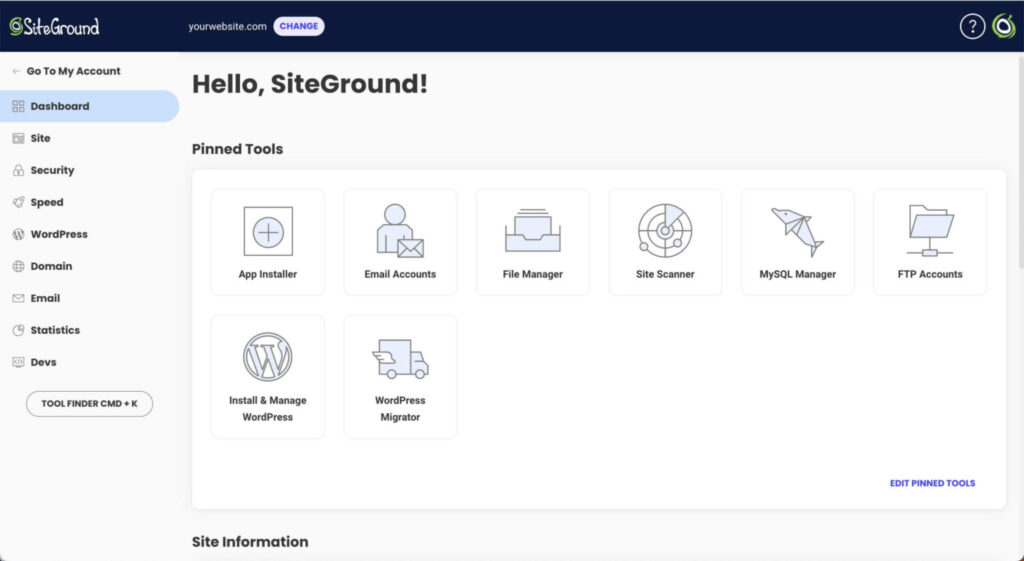
In their effort to stand apart from cPanel hosts, SiteGround created the custom Site Tools dashboard. Much like Hostinger’s hPanel, Site Tools is clean, modern, and extremely user-friendly. It puts powerful features—such as one-click staging environments (GrowBig+), automated daily backups, and free site migration tools—right at the user’s fingertips, simplifying complex developer tasks for the average user.
Finally, their support is consistently rated as one of the best in the industry. SiteGround offers 24/7 expert support via chat, tickets, and—crucially—phone support for complex issues, which is a rare, premium offering for a shared host. Their GoGeek plans even include Advanced Priority Support assigned to their most experienced agents, ensuring fast, expert resolution.
SiteGround Review Cons: The Price Shock and Resource Limits
To maintain a balanced and honest analysis, this SiteGround review must address two major drawbacks that prevent it from being a perfect solution: the extreme price difference and the limitations of shared hosting.
Large Renewal Price Increase
This is the most significant point of criticism. SiteGround utilizes an aggressive introductory pricing model, which is common in the industry but is particularly severe here. While the initial StartUp plan is affordable (around $3.99/mo), the renewal rate for popular plans like GrowBig or GoGeek often jumps by over 700%—reaching $29.99 per month or more.
The crucial issue is that the renewal cost places SiteGround directly into the price bracket of premium managed hosts like WP Engine. Readers must understand that while the quality is high, the initial low price reflects promotional introductory pricing, and the long-term cost is comparable to hosts that offer guaranteed resources and higher security tiers.
Resource Throttling and Inodes
Despite leveraging Google Cloud infrastructure, SiteGround still operates on a shared hosting model. They employ strict account limits, specifically regarding CPU seconds and the Inode count (the total number of files your site can contain).
If your site is on the basic StartUp plan and experiences a sudden traffic spike, or if your image library grows too large, your account can be temporarily throttled or suspended by SiteGround’s automated system. This is an unavoidable limitation of shared hosting that users moving from Kinsta or WP Engine (which use isolated virtual containers) must be aware of.
Migrations are Not Fully Managed
While SiteGround provides an excellent SiteGround Migrator Plugin that makes the process easy, the migration is fundamentally a DIY (Do-It-Yourself) task.
This contrasts sharply with the offerings from Kinsta and WP Engine, which include white-glove, fully managed migration services conducted by their support teams. For non-technical users, having to manage the migration process, even with a plugin, is a point of friction that should be considered when choosing a host. If you are migrating a new site, you can view this simple WordPress Setup Tutorial on SiteGround.
SiteGround vs. The Competition
This table positions SiteGround (Budget Premium) between Hostinger (Budget Value) and Kinsta (True Premium), highlighting why it’s a great choice for quality, but a poor choice for long-term budget.
| Feature | Hostinger (Premium Plan) | SiteGround (GrowBig) | Kinsta (Starter) |
| Core Infrastructure | LiteSpeed Web Server | Google Cloud Platform (GCP) | Google Cloud Platform (GCP) |
| Intro Price (per mo.) | ~ $1.99–$2.99 | ~ $9.99 | $35.00 |
| Renewal Price (per mo.) | ~ $8.99 | ~ $29.99 (High Shock) | $35.00 (No change) |
| Support Channels | Chat/Tickets Only | 24/7 Phone, Chat, Tickets | 24/7 Expert Chat Only |
| Custom Panel | hPanel (Beginner Focus) | Site Tools (Developer Focus) | MyKinsta (Premium Focus) |
| Daily Backups | Weekly (Premium Plan) | Yes (Free on all plans) | Yes (Free on all plans) |
SiteGround Video Review Summary
This independent, objective review provides a quick visual summary of SiteGround’s key advantages (speed, security) and critical drawbacks (renewal costs). It serves as the final validation of our findings before the conclusion and final verdict.
SiteGround Review: Final Verdict
This SiteGround review shows that the host provides the host provides a high-quality shared hosting. Their investment in Google Cloud, proprietary UltraFast PHP, and dedicated AI security creates a premium experience that places SiteGround among the strongest shared hosting providers in its category. For another visual summary, see this Honest Pros & Cons video review.
Who Should Choose SiteGround?
- Agencies & Developers who need a staging environment, daily backups, and expert phone support without the high monthly commitment of Kinsta (initially).
- Small Businesses and serious bloggers prioritizing speed and security over absolute long-term cost savings.
In this SiteGround review, we found the platform particularly suited for developers and growing websites. If your priority is long-term affordability, Hostinger is the better choice for its lower renewal rate. If your priority is guaranteed resource allocation and white-glove support at any price, Kinsta is the superior solution.