
Last Updated on 2026-08-25 by amiraezz
Table of Contents
Disclosure: CoreRated is reader-supported. We earn an affiliate commission when you click through and buy services we recommend. This comes at no extra cost to you and helps keep our site running. Prices and features can change over time. Always check the official Hostinger website for the most current plans and promotions. This review is based on publicly available vendor information and industry documentation.
Hostinger Review Quick Verdict
Hostinger is one of the most competitive budget WordPress hosting providers available today. Its platform uses LiteSpeed servers and built-in caching, along with a custom dashboard called hPanel, to deliver strong performance for its price.
Hostinger Review Pros: Speed, Value, and Ease-of-Use
Hostinger is widely recognized for offering strong performance and modern infrastructure in the budget shared hosting market. Hostinger’s core advantages primarily come from its technology stack and pricing structure.
LiteSpeed Server Technology and Caching
This is Hostinger’s primary performance differentiator. Unlike many traditional shared hosts that rely on Apache, Hostinger uses LiteSpeed Web Server (LSWS) technology, which is designed for high concurrency and improved caching efficiency. LiteSpeed Web Server is designed to handle higher concurrency and efficient caching compared to traditional configurations. Hostinger pairs this with the LiteSpeed Cache (LSCache) plugin, giving every user server-level caching that dramatically reduces load times right out of the box.

The hPanel: The Most Intuitive Dashboard
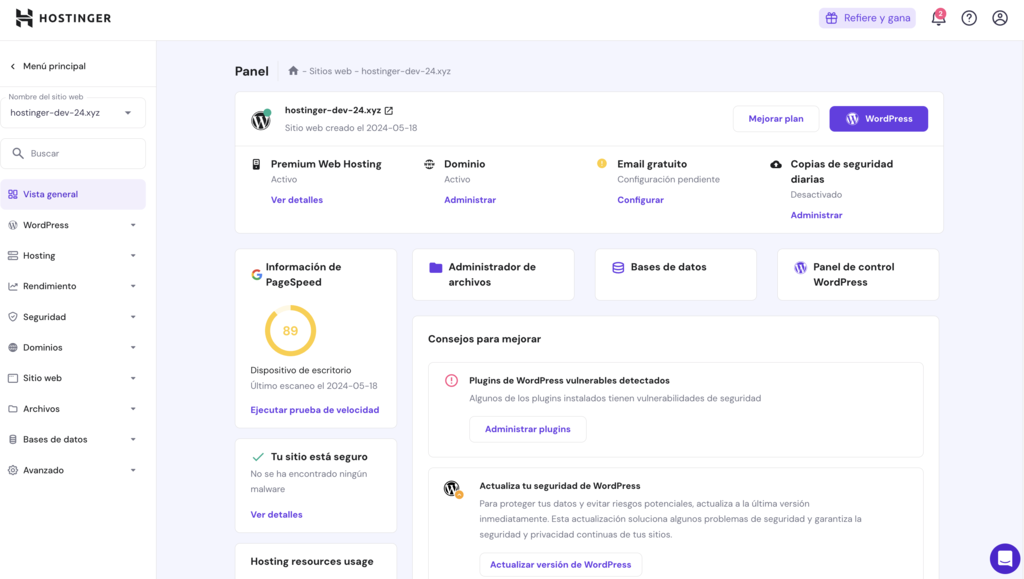
Hostinger built its own custom control panel called hPanel. The dashboard is designed to be simpler than traditional control panels like cPanel, with a cleaner interface and beginner-focused navigation. It is clean, modern, and built with beginners in mind, allowing for one-click WordPress installation and easy management of domains and email accounts.
Strong Introductory Value
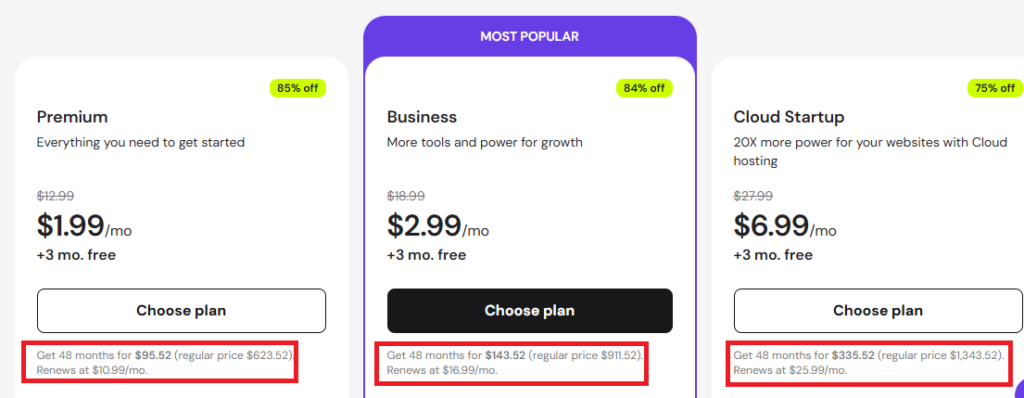
Hostinger’s introductory pricing is often under $3 per month when purchased with a long-term plan (such as 48 months). This makes it one of the most affordable options in the shared hosting market for the level of infrastructure offered. Depending on the plan, users can host up to 100 websites and receive a free domain for the first year and free SSL certificates. This makes Hostinger one of the strongest value-focused hosting options currently available.
Hostinger Review Cons: Renewal Pricing and Resource Limits
To provide an honest analysis, Hostinger’s position as a budget host necessitates certain limitations. These are important for high-traffic Core Rated readers to understand. This Hostinger review will now cover these drawbacks.
The Renewal Price Jump
Hostinger’s primary drawback is the significant renewal cost jump. The introductory rate is heavily discounted to attract new customers. Once the initial long-term contract expires (e.g., after four years), the monthly price may increase significantly after the introductory term ends, which is common across the hosting industry (e.g., from $1.96 to over $10.99 per month), but Hostinger’s jump is particularly steep. A primary point of criticism in our full Hostinger review is the sheer size of the renewal price jump.
Limited Server Resources (Shared Hosting Risk)
Hostinger is fundamentally a shared hosting platform. While they use LiteSpeed, your website still shares computing resources (CPU and RAM) with hundreds of other sites. For high-traffic events, sales, or viral posts, your site may experience throttling or slow loading times as resources are stretched. This is why hosts like Kinsta use isolated Google Cloud containers.
Manual Support and Migrations
While Hostinger support is rated well, it is tiered (L1, L2, L3) and migrations are often self-managed through Hostinger’s migration tools, although support can assist depending on the hosting plan. This contrasts with the managed hosts (Kinsta/WP Engine), which include
unlimited, white-glove migration services and single-tier developer support.
Who Should Use Hostinger?
Hostinger is best suited for:
- beginners launching their first website
- bloggers and small businesses
- developers needing affordable multi-site hosting
Hostinger vs. The Premium Pillars
This table shows the stark trade-off between Value and Managed Resources.
| Feature | Hostinger (Premium) | Kinsta (Starter) | WP Engine (Startup) |
| Intro Price (Per mo.) | ~ $1.99 – $2.99 | $35.00 | ~ $25 – $30 |
| Renewal Price (per mo.) | ~ $10.99 | $35.00 (No change) | ~ $30.00 (Slight increase) |
| Core Infrastructure | LiteSpeed Web Server | Google Cloud Platform | AWS / Google Cloud |
| Resource Allocation | Shared CPU/RAM (Budget) | 2 Fixed PHP Workers (Premium) | Dynamically Managed (Premium) |
| Managed Migrations | $0.00 (DIY) / Paid | Free & Unlimited | Free & Unlimited |
| Included Websites | Up to 100 | 1 | 1 |
Further Research
To see how Hostinger compares to its high-end competitors, be sure to read our detailed Kinsta Review and WP Engine Review. We also explore the ultimate in flexibility in our Cloudways Review.
Third-Party Hostinger Review
To provide a final, objective perspective on the host’s long-term value, the following independent review discusses Hostinger’s infrastructure and the usability of the hPanel dashboard.
Hostinger Review: Final Verdict
Based on available information and industry comparisons, Hostinger is a strong option for new websites, small businesses, and bloggers operating on a strict budget. By investing heavily in their LiteSpeed infrastructure and hPanel dashboard, Hostinger delivers performance that is competitive for its price point.
If your primary focus is price and ease-of-use without sacrificing speed, Hostinger is the clear winner. If you are an established high-traffic business that needs guaranteed resources and fully managed support, we recommend investing in Kinsta or WP Engine instead.