

Last Updated on:
Disclosure: CoreRated is reader-supported. CoreRated earns an affiliate commission when you click through and buy services CoreRated recommends. This comes at no extra cost to you and helps keep our site running.
Choosing the best WordPress hosting solution in 2026 means deciding between three very different philosophies: infrastructure capability, comprehensive features, or the lowest possible price.
At CoreRated, the analysis strips away marketing claims by auditing five industry leaders against their published documentation. This methodical comparison breaks down the most critical factors: initial cost vs. renewal price, infrastructure specifications, support quality, and feature set.
The analysis categorizes each host by its primary strengths. Use this guide to determine which host is the most suitable fit for your site’s specific needs and budget.
Quick Verdict: The Recommended Host by Specific Needs
This table is the methodical summary to find the best WordPress hosting option that aligns with your specific compliance and resource needs. Follow the internal links for a deep dive into the costs and technical details.
User Profile | Top Pick | Primary Justification | Action |
High Traffic / eCommerce | Kinsta | High performance infrastructure, reliability, and autoscaling via Google C2 and C3D (High capability). | |
Established Business / Agency | WP Engine | Strong developer toolset, staging, autoscaling via Google C2, and features for professional workflows. | |
Developer / Tech-Savvy | Cloudways | High-level server control and choice of 5 cloud providers (DigitalOcean, AWS, etc.) | |
New Blog / Budget Max. | Hostinger | Lowest entry price with LiteSpeed performance and hPanel ease-of-use. | |
Good All-Around | SiteGround | Features, speed, and support, but be aware of the significant renewal price increase. |
📊 The Comprehensive 5-Way Comparison Table
The following table synthesizes the most critical data points from CoreRated’s five individual analyses. This table compares pricing, core technology, and feature trade-offs.
Feature / Metric | Kinsta | WP Engine | SiteGround | Cloudways | Hostinger |
Category | High-Performance Managed | Feature Premium | Budget Premium | Flexible Cloud | Budget Value |
Starting Price | High ($350/year) billed annually $35/month, 2 months free | High $300/year ($25/mo) – Coupons available | Low ($35.88/year) $2.99/month billed annually | Low-Mid (~$11/month) | Lowest ($1.99/month) 2 months free + four years subscription for $95.52 |
Renewal Price | Consistent | Consistent | ~6x Hike | Consistent (Pay-as-you-go) | 4x-5.5x Hike |
Infrastructure | Google C2 (Standard) / C3D (Select Locations) | Google Cloud | Google Cloud | Choice of 5 Providers | LiteSpeed |
Support | 24/7 Chat/Tickets | 24/7 Chat/Tickets | 24/7 Phone/Chat | 24/7 Chat/Tickets | 24/7 Live Chat |
Email Hosting | No | No | Yes (Free) | No (Paid Add-on) | Yes (Free) |
Visitor Cap | Strict (35k) | Strict (25k) | Soft Cap (CPU Limited) | Unmetered (Resource Limited) | Strict (25k) |
Infrastructure and Capability Analysis
When selecting the best WordPress hosting, infrastructure capability is non-negotiable. This section breaks down why premium hosts distance themselves from budget providers and which one provides documented infrastructure specifications.
⚙️ Kinsta vs WP Engine: Documented Infrastructure
For verified capability, Kinsta maintains a hardware difference from WP Engine. This difference comes down to infrastructure choice:
- Kinsta utilizes Google’s C3D machines in supported ‘Boosted’ regions and C2 machines in standard locations. C3D machines are specially optimized for sustained performance and load handling. This positions Kinsta as a high-performance option for load handling.
- Both Kinsta and WP Engine utilize Google Cloud’s high-performance Compute-Optimized (C2) infrastructure, though Kinsta has introduced C3D machines for all plans located in specific ‘Boosted’ data centers. This upgrade is specifically engineered for sustained performance, ensuring superior stability during sudden traffic spikes and high-load scenarios.
Verdict: Choose Kinsta if your site is large, global, or requires high-performance infrastructure.
💸 Hostinger vs SiteGround: Budget Capability

In the budget category, the fight for the budget-tier WordPress hosting is much closer, driven by proprietary server technology:
- Hostinger utilizes the LiteSpeed Web Server (LSWS) paired with its internal caching, which improves efficiency compared to traditional Apache setups. This provides high-efficiency load management on its hPanel platform.
- SiteGround uses Standard PHP on its entry-level plan, reserving its proprietary UltraFast PHP setup for GrowBig and GoGeek tiers. However, its stricter CPU limits mean you have less headroom during sudden traffic surges compared to Hostinger’s scalability.
Verdict: For infrastructure on a budget, Hostinger offers the stronger blend of technology and flexible resources, making it the more sustainable long-term budget choice.
Feature Comparison: Support, Panel & Limits

When evaluating high-value WordPress hosting options, the tools and support system are often more important than specific infrastructure differences. This is where the verifiable value in the premium tier hosts and the unique trade-offs of the budget providers become clear.
📞 Customer Support: Who Offers Phone?
Access to expert help is a major differentiator:
- SiteGround offers phone support, though access is often gated behind an initial chat-based triage system. WP Engine offers 24/7 phone support on their Professional plans and above.
- Kinsta relies strictly on chat and tickets.
- Cloudways and Hostinger both offer 24/7 live chat, which is more than adequate for most users, but their support depth can vary.
Verdict: If having a human to call during a service interruption is non-negotiable, SiteGround is the recommended host, despite its renewal cost.
🖥️ Control Panel Comparison
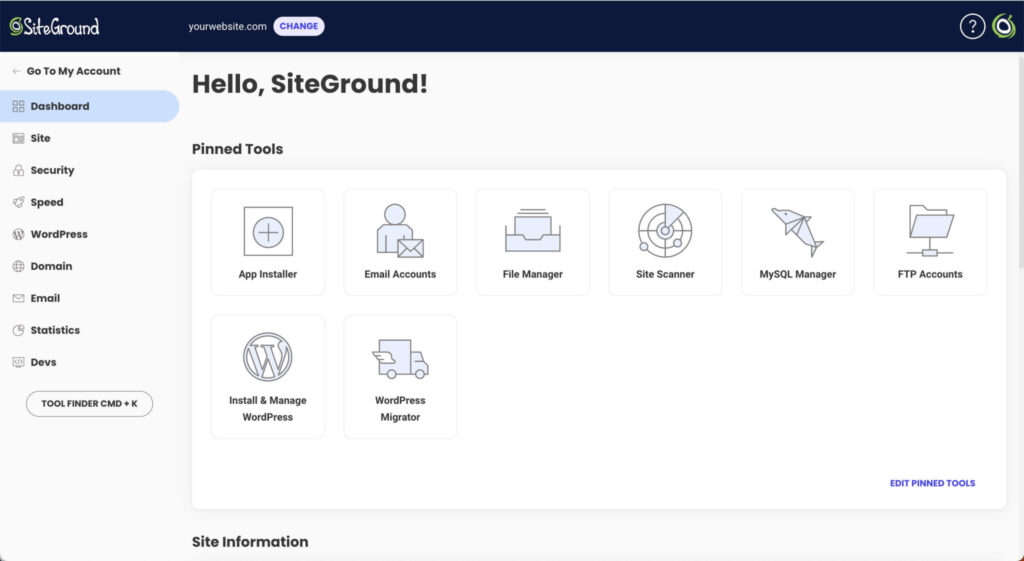
The control panel defines the daily experience of managing your website:
WP Engine offers a capable User Portal, but users often cite MyKinsta as having a higher degree of user-friendliness. Cloudways uses a clean, powerful Console, but it is designed for users familiar with cloud concepts, making it a platform that requires technical familiarity.
Kinsta (MyKinsta) and SiteGround (Site Tools) are highly regarded for panel capability. Both are custom-built, highly intuitive, and focus strictly on WordPress-specific tasks like staging, backups, and caching—streamlining the interface by removing non-essential tools.
Hostinger’s hPanel is a leading custom panel in the budget tier. It is clean, user-friendly, and suitable for beginners.
💰 Resource Limits: The Visitor vs. CPU Debate
Understanding resource limits is the key to avoiding sudden overage fees in best WordPress hosting:
- Kinsta (35,000) and WP Engine (25,000) enforce strict monthly visitor limits on entry plans. This is predictable but requires monitoring.
- SiteGround enforces strict CPU time limits. While harder to track, hitting this limit means performance throttling, which can introduce operational risk for growing sites.
- Hostinger lists specific monthly visit allowances (e.g., ~25,000 on Premium), though they do not strictly meter traffic like managed hosts. Cloudways operates on resource-based limits (RAM/CPU) with no defined visitor caps. Cloudways is truly pay-as-you-go, making it the most flexible. This scalability is a huge reason why Cloudways offers highly flexible WordPress hosting solutions for agencies.
Detailed Host Analysis: Best WordPress Hosting
After analyzing all the data—from infrastructure and documented capability to feature-sets and support—the choice for the best WordPress hosting comes down to balancing cost with your specific needs. Use this final breakdown to make your decisive purchase for your specific requirements.
The analysis of these five hosts clearly identifies the best WordPress hosting options based on audited features and price compliance.
🥇 Kinsta: Choose When Documented Capability is Key
Kinsta sits at the premium end of the managed hosting market. Its strength lies entirely in its singular focus on infrastructure: leveraging Google Cloud’s highest-capability computing machines (C3D and C2) and its purpose-built, highly intuitive MyKinsta dashboard. If you run a high-traffic blog, a scaling e-commerce site, or a demanding membership portal, Kinsta’s price is justified by its documented capability and stability.
Choose Kinsta If: Your priority is verified high-capability infrastructure, and your budget can accommodate the premium price tag.
Action: For all the technical details and data points, read CoreRated’s Complete Kinsta Review.
🛠️ WP Engine: Choose When Managed Features are Essential
WP Engine specializes in comprehensive managed features for developers, agencies, and established businesses. While Kinsta’s C3D architecture offers a different performance focus, WP Engine excels in its developer toolset, staging environment simplicity, and included features like the Genesis Framework and premium StudioPress themes. WP Engine provides a highly capable and reliable platform for professional workflows.
Choose WP Engine If: You are seeking the best WordPress hosting platform for agencies or developers who need reliable, feature-rich staging, excellent support, and seamless workflow integration.
Action: Learn why the premium pricing is justified by the feature-set in CoreRated’s Comprehensive WP Engine Review.
☁️ Cloudways: Choose When You Need Flexibility and Scaling
Cloudways is the choice for the tech-savvy user who needs performance without the strict visitor caps of traditional managed hosting. By letting you choose your cloud provider (AWS, DigitalOcean, Vultr, etc.), Cloudways gives you granular control over resources and allows you to scale vertically with ease (horizontal scaling requires manual setup). Its pay-as-you-go model ensures you only pay for what you use, avoiding expensive upfront commitments.
Note that the entry price is $11/month (Standard Droplet) or $14/month (Premium Droplet). Users must manually toggle ‘Standard’ to see the lower rate.
Choose Cloudways If: You are a developer or business needing affordable, high-performance hosting power from a custom-configured cloud and dislike strict visitor limits.
Action: If you are ready to manage your own cloud, see CoreRated’s full breakdown in the Cloudways Hosting Review.
💲 Hostinger: Choose When Budget is the Biggest Factor
Hostinger is a competitive option in the budget tier. It manages to deliver efficient LiteSpeed capability and an excellent, beginner-friendly control panel (hPanel) at a price point that is often 5-10 times cheaper than the premium hosts. While Kinsta’s architecture is specialized, Hostinger provides a high price-to-performance ratio, making it the most suitable entry point for new bloggers and small business owners.
Choose Hostinger If: You are a new site owner, run a hobby blog, or simply need the infrastructure with a high price-to-performance ratio for under $4/month.
Action: CoreRated verifies whether Hostinger delivers on its capability promises in CoreRated’s In-Depth Hostinger Review.
⚠️ SiteGround: Choose for Great Support (But Read the Fine Print)
SiteGround remains a strong contender for its excellent custom Site Tools control panel and unique offering of 24/7 phone support. Its performance on Google Cloud is excellent, and it includes free email hosting. However, a notable factor is the significant ~6x renewal price hike after the introductory period, which can surprise users unaware of the standard rates.
Choose SiteGround If: You prioritize phone support and a beginner-friendly panel when selecting the best WordPress hosting, and you understand and accept the high renewal price.
Action: Be aware of the standard renewal price increase—CoreRated covers the actual long-term cost in the Full SiteGround Review.
Final Verdict: CoreRated’s Analysis for Every Budget
Choosing the best WordPress hosting solution is not about finding the cheapest option—it’s about finding the host that meets your specific needs without sacrificing documented capability.
- If your site is large and generating income, spending more on Kinsta or WP Engine provides higher uptime guarantees and infrastructure capability that may justify the premium cost for business-critical sites.
- If you are just starting out, Hostinger provides strong capability and tools at a highly competitive price, allowing you to grow with strong performance and tools.
- Cloudways remains the most flexible option for developers who want the power of AWS or Google Cloud without the direct, low-level server administration.
The Final Strategic Verdict: The Best Host Depends on Your Wallet
After extensive data verification and comparing dozens of data points, CoreRated’s final verdict remains defined by price tier:
Winner For… | The Best Host is… | Why We Picked It | Action |
Raw Speed & Performance | Kinsta | Google C3D infrastructure and MyKinsta panel provide verifiable performance benefits at this price point. | |
Budget & Value | Hostinger | LiteSpeed hosting delivers excellent performance for less than $4/month. | |
All-Around Professional | WP Engine | Extensive feature-set, developer tools, and staging environments. |
By using this strategic guide and clicking through to the best deal for your specific needs, you can ensure your WordPress site is built on the highest-capability, most reliable foundation possible.
Sources & References
To maintain transparency, CoreRated provides the direct sources for the technical data used in this review. All data was verified as of January 2026.
- Official Pricing & Plans (Kinsta): Kinsta Managed WordPress Pricing — Verified: Single 35k plan includes 35,000 monthly visits and Google Cloud C2/C3D infrastructure.
- Official Pricing & Features (WP Engine): WP Engine Plan Specifications — Verified: Startup plan includes 25,000 visits/mo and the Genesis Framework/StudioPress themes.
- Renewal Price Policy (SiteGround): SiteGround WordPress Hosting Plans — Verified: This page lists the current “Special Price” vs. the standard “Renewal Price” in the plan details (hover over the price or check the footer terms).
- LiteSpeed Technology (Hostinger): Hostinger Web Hosting Features — Confirms the use of LiteSpeed Web Server (LSWS) and hPanel on Premium and Business plans.
- Cloud Provider Flexibility (Cloudways): Cloudways Pricing & Providers — Verified: Offers a choice of 5 cloud providers (DigitalOcean, AWS, Google Cloud, Vultr, Linode) with a pay-as-you-go billing model.